Day 3.
We will be talking about the CLI and the registry.
Let's talk about the pre-shadcn era -
- Before shadcn, developers used to install the components as a package from the component libraries (e.g. Material-UI, Ant Design and Chakra UI). That means the code lived in
node_modules, it was hard to customize and it increased the bundle size. - To solve this we can give the developer the entire code of the component, which they will paste into their codebase, and they can customize it with no need to worry about the bundle size.
- But isn't it a pain to copy paste the components? Isn't there a way to automate this and distribute the code to a large number of developers?
- That's where the shadcn ecosystem and the registry distribution system come in.
What the hell is this registry?
- Registry is a distribution system for components, which allows you to distribute your custom components, hooks, pages, config, rules and other files to any project.
- So does that mean we can add or import a component from the registry using the CLI by running the shadcn package? Hum, hum. So does it make the registry similar to npm (like we can publish or import packages from npm)? You can say that, but they are not exactly the same.
NPM
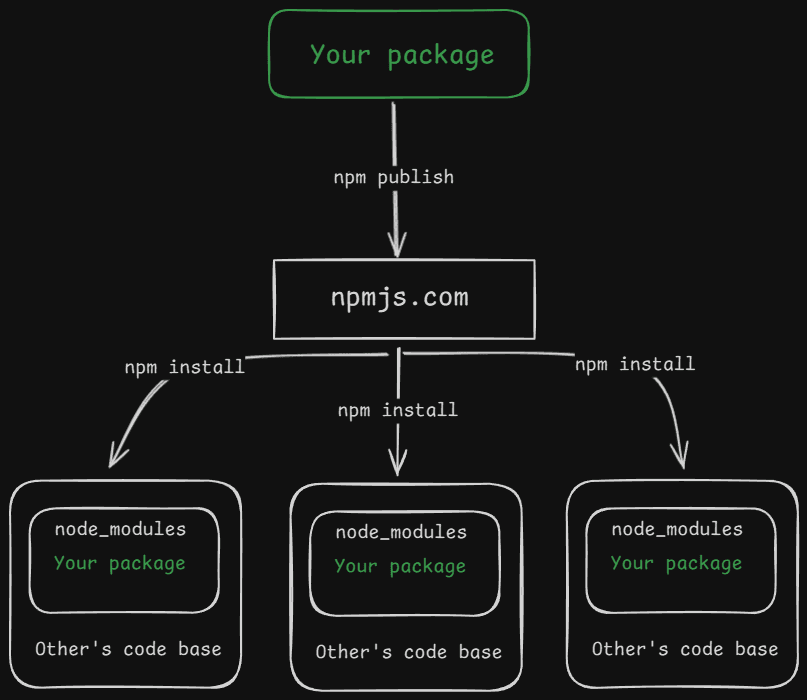
- In the npm ecosystem there is a central warehouse that stores packages and distributes them.
- You publish your package to the npmjs server, and your package is stored there.
- Whenever someone needs your package they will just install it from the CLI, and it will be installed into
node_modules.
Registry
- And this is a registry. There is no centralized warehouse where your component code is stored, it works in a different way. The registry lives in every codebase which wants to share its components with everyone. Let's understand it in detail below. https://ui.shadcn.com/docs/registry
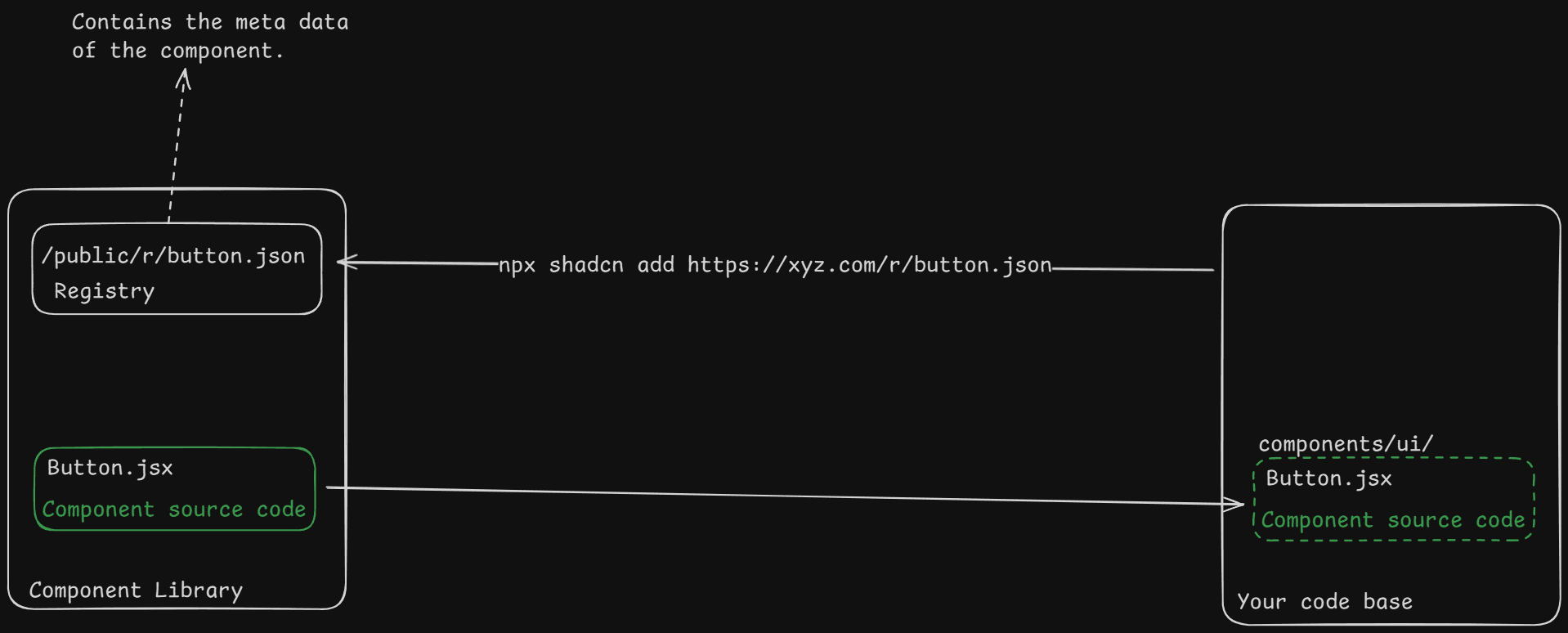
- I will explain this with the flow, from how the component is registered to installing and using it.
Publisher -
- 1
You have built a beautiful UI component which lies in your codebase, now you want to share it with the world so that they can use it in their projects too.
- 2
You will create a
registry.jsonfile in the root folder of your codebase.What does it contain?
- The
registry.jsonis the entry point for the registry. It contains the registry's name, homepage, and defines all the items present in the registry. - Go through this for more understanding of the file's schema https://ui.shadcn.com/docs/registry/registry-json
- 3
Add your component to the registry items by following the schema https://ui.shadcn.com/docs/registry/registry-item-json
- 4
Run the build script provided by the shadcn CLI.
- 5
The build script will generate the registry JSON files in the public directory of your project, e.g.
public/r/button.json. - 6
Now you just need to deploy your project to a public URL, that's it.
Consumer -
- 1
The one who needs the component will just run a command like:
bashnpx shadcn@latest add https://xyz.com/r/button.json # this is the new CLI 3.0 using namespaces npx shadcn@latest add @xyz/button - 2
This will make a request to
https://xyz.com/r/button.jsonand run some code in the shadcn package, which installs the necessary packages for the component and copies the source code from their project to your project. - 3
And now the component can be imported and also be customized.
This is the main package which runs when you use the shadcn CLI. It is responsible for initializing the shadcn configuration and dependencies, adding shadcn UI components into your project, scaffolding projects, wiring up Tailwind, managing CSS variables, and integrating with a component registry.